> ## Documentation Index
> Fetch the complete documentation index at: https://docs.agentfront.dev/llms.txt
> Use this file to discover all available pages before exploring further.
# From 10 Lines to Autonomous Agents: How FrontMCP Turns Any Agent Into an MCP Tool
> Learn how FrontMCP's Agent as Tool pattern transforms autonomous AI agents into standard MCP tools—enabling multi-agent orchestration, tool isolation, and LLM-agnostic execution with just a decorator.
> Estimated reading time: **15 minutes**
 **Here's a scenario you might recognize:**
You've built specialized AI agents. A research agent that gathers data. A writer agent that crafts content. An analyst agent that crunches numbers. Each one works brilliantly—in isolation.
Then someone asks: "Can the writer agent use the research agent's findings?"
Suddenly you're knee-deep in:
* Custom message passing between agents
* State synchronization nightmares
* LLM provider lock-in (your agents only work with OpenAI)
* Duplicate tool definitions across agents
* No visibility into what's happening inside the swarm
**You're not building AI features anymore. You're building orchestration infrastructure.**
What if your agents could just... talk to each other? Like regular MCP tools?
That's exactly what FrontMCP's **Agent as Tool** pattern does.
***
## The Multi-Agent Problem
Let's break down what makes multi-agent systems so painful to build:
| Challenge | Traditional Approach | Time Sink |
| -------------------- | ----------------------------------------------------- | ----------------------- |
| **Communication** | Custom message bus, shared state, event systems | Days of infrastructure |
| **Provider Lock-in** | Rewrite agents for each LLM (OpenAI, Anthropic, etc.) | 2-3x development effort |
| **Tool Isolation** | Copy-paste tool definitions, maintain consistency | Ongoing maintenance |
| **Visibility** | Build custom logging, tracing, debugging | More infrastructure |
| **Security** | Implement auth, rate limits, sandboxing per agent | Security review cycles |
Most teams give up on multi-agent and fall back to single monolithic agents. Which works—until it doesn't.
***
## What is "Agent as Tool"?
FrontMCP flips the model: **every agent automatically becomes an MCP tool.**
When you define an agent:
```typescript theme={"theme":{"light":"snazzy-light","dark":"dark-plus"}}
@Agent({
name: 'research-agent',
description: 'Researches topics and compiles summaries',
// ...
})
class ResearchAgent extends AgentContext {}
```
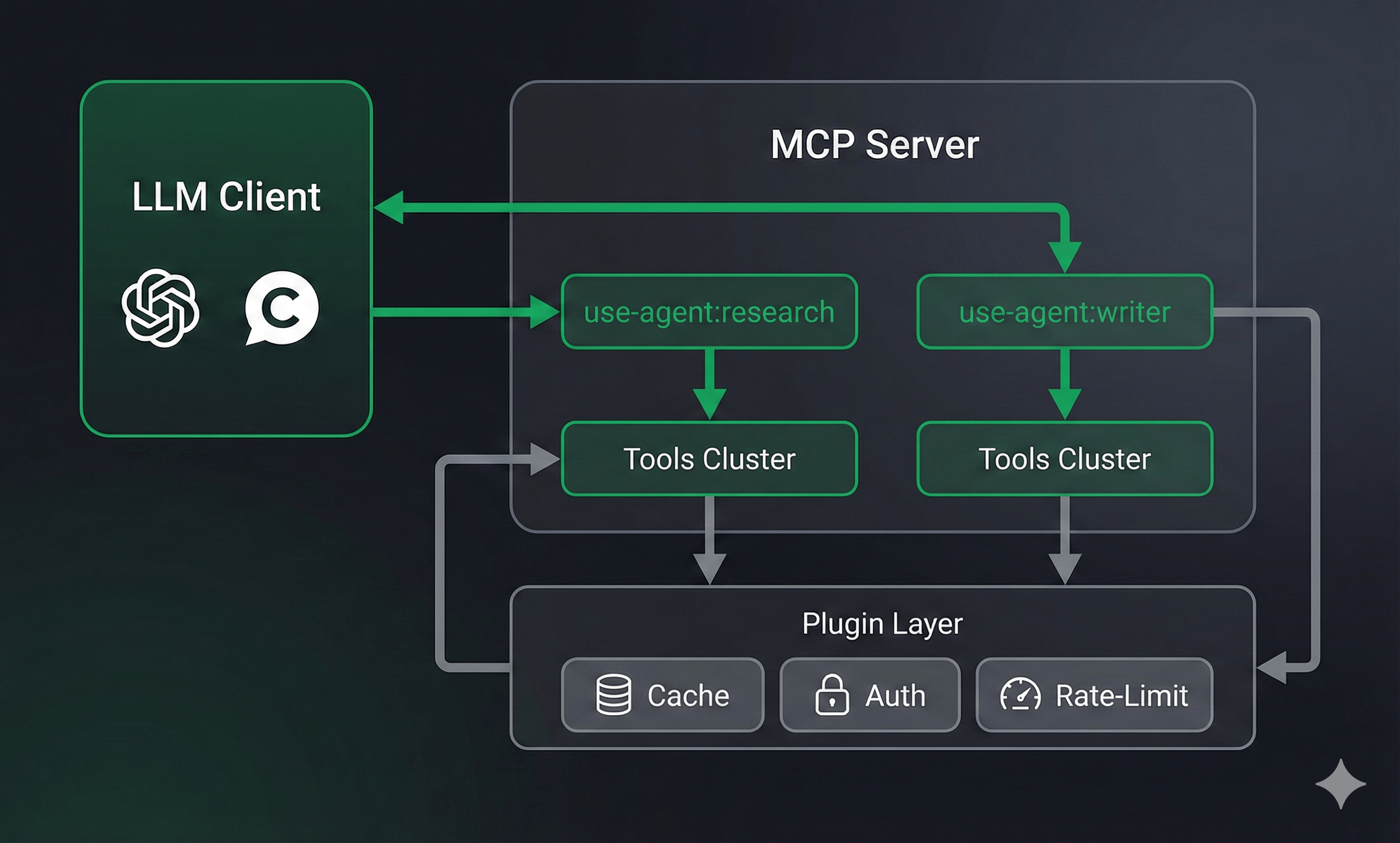
FrontMCP automatically registers it as `use-agent:research-agent` in your tool registry. Any other agent—or any MCP client—can call it like a regular tool.
OpenAI, Anthropic, Google, Mistral, Groq—or bring your own adapter. Switch providers without rewriting agents.
Agents go through the same `tools:call-tool` flow as regular tools. All your plugins (cache, rate-limit, auth) work automatically.
Each agent gets its own isolated scope. Its tools, resources, and prompts are private—not exposed to the parent app.
Built-in visibility controls let you define which agents can see and invoke other agents. Orchestrator patterns work out of the box.
***
## Three Ways to Create Agents
FrontMCP offers three patterns depending on your needs:
### 1. Class-Based (Default)—No Execute Method Needed
The simplest approach: define your agent metadata and let FrontMCP handle the LLM loop.
```typescript theme={"theme":{"light":"snazzy-light","dark":"dark-plus"}}
import { Agent, AgentContext, z } from '@frontmcp/sdk';
import { WebSearchTool, SummarizeTool } from './tools';
@Agent({
name: 'research-agent',
description: 'Researches topics and compiles summaries',
systemInstructions: `You are a research assistant.
Use web-search to find information, then summarize your findings.
Be thorough but concise.`,
inputSchema: {
topic: z.string().describe('Topic to research'),
depth: z.enum(['brief', 'detailed']).default('brief'),
},
outputSchema: {
summary: z.string(),
sources: z.array(z.string()),
},
llm: {
provider: 'openai',
model: 'gpt-4-turbo',
apiKey: { env: 'OPENAI_API_KEY' },
},
tools: [WebSearchTool, SummarizeTool],
})
export default class ResearchAgent extends AgentContext {}
```
That's it. No `execute()` method needed. FrontMCP runs the LLM loop automatically:
1. Sends system instructions + user input to the LLM
2. If the LLM requests tool calls, executes them
3. Feeds results back to the LLM
4. Repeats until the LLM responds with final output
5. Validates output against `outputSchema`
### 2. Class-Based with Custom Execute
Need custom logic? Override the `execute()` method:
```typescript theme={"theme":{"light":"snazzy-light","dark":"dark-plus"}}
@Agent({
name: 'smart-research-agent',
// ... same config as above
})
class SmartResearchAgent extends AgentContext {
async execute(input: { topic: string; depth: string }) {
// Custom pre-processing
this.notify(`Starting research on: ${input.topic}`, 'info');
// Call the default LLM loop
const result = await super.execute(input);
// Custom post-processing
if (result.sources.length === 0) {
this.notify('No sources found, retrying with broader search', 'warning');
return super.execute({ ...input, topic: `${input.topic} overview` });
}
return result;
}
}
```
### 3. Function Builder Pattern
For simpler agents or when you prefer functional style:
```typescript theme={"theme":{"light":"snazzy-light","dark":"dark-plus"}}
import { agent, z } from '@frontmcp/sdk';
const EchoAgent = agent({
name: 'echo-agent',
description: 'Echoes back the input with analysis',
inputSchema: {
message: z.string()
},
llm: {
provider: 'openai',
model: 'gpt-3.5-turbo',
apiKey: { env: 'OPENAI_API_KEY' }
},
})(async ({ message }) => {
// Direct return without LLM loop
return { echoed: `You said: ${message}` };
});
```
Use the function builder for simple agents that don't need the full LLM loop. Use class-based for agents that need tool access, custom logic, or advanced configuration.
***
## Registering Agents in Your App
Agents are registered just like tools:
```typescript theme={"theme":{"light":"snazzy-light","dark":"dark-plus"}}
import { App } from '@frontmcp/sdk';
import ResearchAgent from './agents/research.agent';
import WriterAgent from './agents/writer.agent';
import AnalystAgent from './agents/analyst.agent';
import { DataFetchTool, ChartTool } from './tools';
@App({
id: 'content-platform',
name: 'Content Creation Platform',
agents: [ResearchAgent, WriterAgent, AnalystAgent],
tools: [DataFetchTool, ChartTool],
})
export default class ContentPlatformApp {}
```
Your MCP client now sees:
* `use-agent:research-agent`
* `use-agent:writer-agent`
* `use-agent:analyst-agent`
* `data-fetch`
* `chart`
**Here's a scenario you might recognize:**
You've built specialized AI agents. A research agent that gathers data. A writer agent that crafts content. An analyst agent that crunches numbers. Each one works brilliantly—in isolation.
Then someone asks: "Can the writer agent use the research agent's findings?"
Suddenly you're knee-deep in:
* Custom message passing between agents
* State synchronization nightmares
* LLM provider lock-in (your agents only work with OpenAI)
* Duplicate tool definitions across agents
* No visibility into what's happening inside the swarm
**You're not building AI features anymore. You're building orchestration infrastructure.**
What if your agents could just... talk to each other? Like regular MCP tools?
That's exactly what FrontMCP's **Agent as Tool** pattern does.
***
## The Multi-Agent Problem
Let's break down what makes multi-agent systems so painful to build:
| Challenge | Traditional Approach | Time Sink |
| -------------------- | ----------------------------------------------------- | ----------------------- |
| **Communication** | Custom message bus, shared state, event systems | Days of infrastructure |
| **Provider Lock-in** | Rewrite agents for each LLM (OpenAI, Anthropic, etc.) | 2-3x development effort |
| **Tool Isolation** | Copy-paste tool definitions, maintain consistency | Ongoing maintenance |
| **Visibility** | Build custom logging, tracing, debugging | More infrastructure |
| **Security** | Implement auth, rate limits, sandboxing per agent | Security review cycles |
Most teams give up on multi-agent and fall back to single monolithic agents. Which works—until it doesn't.
***
## What is "Agent as Tool"?
FrontMCP flips the model: **every agent automatically becomes an MCP tool.**
When you define an agent:
```typescript theme={"theme":{"light":"snazzy-light","dark":"dark-plus"}}
@Agent({
name: 'research-agent',
description: 'Researches topics and compiles summaries',
// ...
})
class ResearchAgent extends AgentContext {}
```
FrontMCP automatically registers it as `use-agent:research-agent` in your tool registry. Any other agent—or any MCP client—can call it like a regular tool.
OpenAI, Anthropic, Google, Mistral, Groq—or bring your own adapter. Switch providers without rewriting agents.
Agents go through the same `tools:call-tool` flow as regular tools. All your plugins (cache, rate-limit, auth) work automatically.
Each agent gets its own isolated scope. Its tools, resources, and prompts are private—not exposed to the parent app.
Built-in visibility controls let you define which agents can see and invoke other agents. Orchestrator patterns work out of the box.
***
## Three Ways to Create Agents
FrontMCP offers three patterns depending on your needs:
### 1. Class-Based (Default)—No Execute Method Needed
The simplest approach: define your agent metadata and let FrontMCP handle the LLM loop.
```typescript theme={"theme":{"light":"snazzy-light","dark":"dark-plus"}}
import { Agent, AgentContext, z } from '@frontmcp/sdk';
import { WebSearchTool, SummarizeTool } from './tools';
@Agent({
name: 'research-agent',
description: 'Researches topics and compiles summaries',
systemInstructions: `You are a research assistant.
Use web-search to find information, then summarize your findings.
Be thorough but concise.`,
inputSchema: {
topic: z.string().describe('Topic to research'),
depth: z.enum(['brief', 'detailed']).default('brief'),
},
outputSchema: {
summary: z.string(),
sources: z.array(z.string()),
},
llm: {
provider: 'openai',
model: 'gpt-4-turbo',
apiKey: { env: 'OPENAI_API_KEY' },
},
tools: [WebSearchTool, SummarizeTool],
})
export default class ResearchAgent extends AgentContext {}
```
That's it. No `execute()` method needed. FrontMCP runs the LLM loop automatically:
1. Sends system instructions + user input to the LLM
2. If the LLM requests tool calls, executes them
3. Feeds results back to the LLM
4. Repeats until the LLM responds with final output
5. Validates output against `outputSchema`
### 2. Class-Based with Custom Execute
Need custom logic? Override the `execute()` method:
```typescript theme={"theme":{"light":"snazzy-light","dark":"dark-plus"}}
@Agent({
name: 'smart-research-agent',
// ... same config as above
})
class SmartResearchAgent extends AgentContext {
async execute(input: { topic: string; depth: string }) {
// Custom pre-processing
this.notify(`Starting research on: ${input.topic}`, 'info');
// Call the default LLM loop
const result = await super.execute(input);
// Custom post-processing
if (result.sources.length === 0) {
this.notify('No sources found, retrying with broader search', 'warning');
return super.execute({ ...input, topic: `${input.topic} overview` });
}
return result;
}
}
```
### 3. Function Builder Pattern
For simpler agents or when you prefer functional style:
```typescript theme={"theme":{"light":"snazzy-light","dark":"dark-plus"}}
import { agent, z } from '@frontmcp/sdk';
const EchoAgent = agent({
name: 'echo-agent',
description: 'Echoes back the input with analysis',
inputSchema: {
message: z.string()
},
llm: {
provider: 'openai',
model: 'gpt-3.5-turbo',
apiKey: { env: 'OPENAI_API_KEY' }
},
})(async ({ message }) => {
// Direct return without LLM loop
return { echoed: `You said: ${message}` };
});
```
Use the function builder for simple agents that don't need the full LLM loop. Use class-based for agents that need tool access, custom logic, or advanced configuration.
***
## Registering Agents in Your App
Agents are registered just like tools:
```typescript theme={"theme":{"light":"snazzy-light","dark":"dark-plus"}}
import { App } from '@frontmcp/sdk';
import ResearchAgent from './agents/research.agent';
import WriterAgent from './agents/writer.agent';
import AnalystAgent from './agents/analyst.agent';
import { DataFetchTool, ChartTool } from './tools';
@App({
id: 'content-platform',
name: 'Content Creation Platform',
agents: [ResearchAgent, WriterAgent, AnalystAgent],
tools: [DataFetchTool, ChartTool],
})
export default class ContentPlatformApp {}
```
Your MCP client now sees:
* `use-agent:research-agent`
* `use-agent:writer-agent`
* `use-agent:analyst-agent`
* `data-fetch`
* `chart`
 ```mermaid theme={"theme":{"light":"snazzy-light","dark":"dark-plus"}}
sequenceDiagram
participant Client as MCP Client
participant App as FrontMCP App
participant Registry as Agent Registry
participant Agent as ResearchAgent
participant LLM as OpenAI
Client->>App: tools/call: use-agent:research-agent
App->>Registry: findAgent('research-agent')
Registry-->>App: AgentInstance
App->>Agent: execute({ topic: 'AI trends' })
loop LLM Loop (max 10 iterations)
Agent->>LLM: completion(messages, tools)
LLM-->>Agent: toolCalls: [web-search]
Agent->>Agent: executeTool('web-search', {...})
Agent->>LLM: completion(messages + toolResult)
LLM-->>Agent: content: "Summary..."
end
Agent-->>App: { summary: "...", sources: [...] }
App-->>Client: CallToolResult
```
***
## Agent Configuration Deep Dive
### LLM Configuration
FrontMCP supports multiple LLM providers out of the box:
```typescript theme={"theme":{"light":"snazzy-light","dark":"dark-plus"}}
llm: {
provider: 'openai',
model: 'gpt-4-turbo',
apiKey: { env: 'OPENAI_API_KEY' },
temperature: 0.7,
maxTokens: 4000,
}
```
```typescript theme={"theme":{"light":"snazzy-light","dark":"dark-plus"}}
llm: {
provider: 'anthropic',
model: 'claude-3-opus-20240229',
apiKey: { env: 'ANTHROPIC_API_KEY' },
temperature: 0.5,
}
```
```typescript theme={"theme":{"light":"snazzy-light","dark":"dark-plus"}}
llm: {
provider: 'google',
model: 'gemini-pro',
apiKey: { env: 'GOOGLE_API_KEY' },
}
```
```typescript theme={"theme":{"light":"snazzy-light","dark":"dark-plus"}}
llm: {
adapter: MyCustomLlmAdapter, // implements AgentLlmAdapter
}
// Or use DI injection:
llm: LLM_ADAPTER_TOKEN,
```
### Agent-Scoped Components
Each agent can have its own private tools, resources, prompts, and even nested agents:
```typescript theme={"theme":{"light":"snazzy-light","dark":"dark-plus"}}
@Agent({
name: 'content-creator',
// Private tools only this agent can use
tools: [DraftTool, EditTool, PublishTool],
// Private resources
resources: [StyleGuideResource],
// Private prompts
prompts: [ToneAnalysisPrompt],
// Nested agents
agents: [SpellCheckAgent, SEOAgent],
// Private providers
providers: [ContentDatabaseProvider],
// ...
})
```
Agent-scoped components are **not exposed** to the parent app or other agents. This is intentional—it prevents tool conflicts and maintains isolation.
### Execution Configuration
Fine-tune how agents run:
```typescript theme={"theme":{"light":"snazzy-light","dark":"dark-plus"}}
@Agent({
name: 'fast-agent',
execution: {
timeout: 30000, // 30 second timeout (default: 120000)
maxIterations: 5, // Max LLM loop iterations (default: 10)
enableStreaming: true, // Stream responses
enableNotifications: true, // Send progress notifications
notificationInterval: 500, // Notify every 500ms
inheritParentTools: true, // Access parent app's tools
useToolFlow: true, // Go through plugin/hook layer
inheritPlugins: true, // Use parent's plugins
},
// ...
})
```
### Plugin Metadata
Agents support the same plugin metadata as tools:
```typescript theme={"theme":{"light":"snazzy-light","dark":"dark-plus"}}
@Agent({
name: 'cached-research',
// Cache agent results
cache: { ttl: 3600 },
// Show in CodeCall discovery
codecall: { visibleInListTools: true },
// Require authentication
auth: { required: true, scopes: ['research:read'] },
// Rate limit calls
rateLimit: { limit: 10, window: '1m' },
// Retry on failure
retry: { attempts: 3, backoff: 'exponential' },
// ...
})
```
***
## Multi-Agent Swarm Patterns
### The Orchestrator Pattern
One agent coordinates multiple worker agents:
```typescript theme={"theme":{"light":"snazzy-light","dark":"dark-plus"}}
// Worker agents (hidden from each other)
@Agent({
name: 'research-worker',
swarm: {
isVisible: true, // Visible to other agents
canSeeOtherAgents: false, // Cannot invoke other agents
},
tools: [WebSearchTool],
// ...
})
class ResearchWorker extends AgentContext {}
@Agent({
name: 'writer-worker',
swarm: {
isVisible: true,
canSeeOtherAgents: false
},
tools: [DraftTool],
// ...
})
class WriterWorker extends AgentContext {}
// Orchestrator (can see and invoke workers)
@Agent({
name: 'content-orchestrator',
systemInstructions: `You coordinate content creation.
1. Use research-worker to gather information
2. Use writer-worker to draft content
3. Review and refine the final output`,
swarm: {
canSeeOtherAgents: true,
visibleAgents: ['research-worker', 'writer-worker'],
maxCallDepth: 3, // Prevent infinite recursion
},
// ...
})
class ContentOrchestrator extends AgentContext {}
```
When `ContentOrchestrator` runs, it can invoke `use-agent:research-worker` and `use-agent:writer-worker` as tools. The workers only see their own private tools.
### Nested Agents
For tighter coupling, embed agents directly:
```typescript theme={"theme":{"light":"snazzy-light","dark":"dark-plus"}}
@Agent({
name: 'article-generator',
agents: [ResearchWorker, WriterWorker, EditorAgent],
tools: [PublishTool],
systemInstructions: `Generate articles by:
1. Research the topic (use-agent:research-worker)
2. Write the draft (use-agent:writer-worker)
3. Edit for quality (use-agent:editor-agent)
4. Publish the final version (publish tool)`,
// ...
})
class ArticleGenerator extends AgentContext {}
```
Nested agents are scoped to the parent agent and not visible to the broader app.
```typescript theme={"theme":{"light":"snazzy-light","dark":"dark-plus"}}
swarm: {
// Can this agent invoke other agents?
canSeeOtherAgents?: boolean; // default: false
// If true, which specific agents can it see?
visibleAgents?: string[]; // whitelist of agent IDs
// Is this agent visible to other agents?
isVisible?: boolean; // default: true
// Maximum nested agent call depth
maxCallDepth?: number; // default: 3
}
```
***
## Real-World Example: Weather Summary Agent
Here's the complete weather agent from the FrontMCP demo:
```typescript theme={"theme":{"light":"snazzy-light","dark":"dark-plus"}}
import { Agent, AgentContext, z } from '@frontmcp/sdk';
import GetWeatherTool from '../tools/get-weather.tool';
@Agent({
name: 'summary-agent',
description: 'Provides weather summaries for any location',
systemInstructions: `You are a weather assistant.
Use the get-weather tool to fetch current conditions,
then provide a friendly, conversational summary.
Include temperature, conditions, and any notable weather patterns.`,
inputSchema: {
location: z.string().describe('City name or location'),
units: z.enum(['celsius', 'fahrenheit']).optional().default('celsius'),
},
outputSchema: {
summary: z.string().describe('Friendly weather summary'),
temperature: z.number().describe('Current temperature'),
conditions: z.string().describe('Weather conditions'),
},
llm: {
provider: 'openai',
model: 'gpt-4-turbo',
apiKey: { env: 'OPENAI_API_KEY' },
},
tools: [GetWeatherTool],
codecall: { visibleInListTools: true },
})
export default class SummaryAgent extends AgentContext {}
```
Registered in the app:
```typescript theme={"theme":{"light":"snazzy-light","dark":"dark-plus"}}
@App({
id: 'weather',
name: 'Weather MCP App',
agents: [SummaryAgent],
tools: [GetWeatherTool],
})
export default class WeatherMcpApp {}
```
Now any MCP client can call:
```json theme={"theme":{"light":"snazzy-light","dark":"dark-plus"}}
{
"method": "tools/call",
"params": {
"name": "use-agent:summary-agent",
"arguments": {
"location": "San Francisco",
"units": "fahrenheit"
}
}
}
```
And get back:
```json theme={"theme":{"light":"snazzy-light","dark":"dark-plus"}}
{
"content": [
{
"type": "text",
"text": "{\"summary\":\"It's a beautiful day in San Francisco! Currently 68°F with clear skies and a light breeze. Perfect weather for a walk.\",\"temperature\":68,\"conditions\":\"sunny\"}"
}
]
}
```
***
## When to Use Agents vs Tools
* Task requires **multi-step reasoning**
* You need **LLM decision-making** between steps
* Orchestrating **multiple tools** with context
* Building **autonomous workflows**
* Need **different LLM providers** for different tasks
* Task is **deterministic** (no LLM needed)
* Single **API call or data fetch**
* **Performance-critical** operations
* **Simple CRUD** operations
* No decision-making required
| Scenario | Recommendation |
| --------------------------------------------- | -------------- |
| Fetch weather data | Tool |
| Summarize weather for trip planning | Agent |
| Create a database record | Tool |
| Research and write a report | Agent |
| Send an email | Tool |
| Draft, review, and send personalized outreach | Agent |
***
## Performance Considerations
Agents add overhead compared to raw tools:
| Operation | Latency | Notes |
| -------------------- | ---------- | ------------------------------- |
| Tool execution | \~50-200ms | Direct function call |
| Agent (1 iteration) | \~1-3s | LLM round-trip |
| Agent (5 iterations) | \~5-15s | Multiple LLM calls |
| Nested agents | Multiplied | Each agent adds its own latency |
Use `execution.useToolFlow: false` to bypass the plugin layer for agent-internal tool calls. This reduces latency but loses plugin features like caching and rate limiting.
***
## Get Started
Complete API reference for agent configuration, swarm patterns, and LLM adapters
Working example with agent, tools, and UI rendering
Get your first FrontMCP server running with agents
Deep dive into orchestrator patterns and visibility controls
***
*Agents are just one piece of FrontMCP's production-ready MCP framework. Combine them with [CodeCall](/frontmcp/plugins/codecall/overview) for code execution, [Tool UI](/frontmcp/ui/overview) for rich widgets, and deploy to [Vercel](/frontmcp/deployment/serverless) or any Node.js environment.*
*[Star us on GitHub](https://github.com/agentfront/frontmcp) to follow development.*
```mermaid theme={"theme":{"light":"snazzy-light","dark":"dark-plus"}}
sequenceDiagram
participant Client as MCP Client
participant App as FrontMCP App
participant Registry as Agent Registry
participant Agent as ResearchAgent
participant LLM as OpenAI
Client->>App: tools/call: use-agent:research-agent
App->>Registry: findAgent('research-agent')
Registry-->>App: AgentInstance
App->>Agent: execute({ topic: 'AI trends' })
loop LLM Loop (max 10 iterations)
Agent->>LLM: completion(messages, tools)
LLM-->>Agent: toolCalls: [web-search]
Agent->>Agent: executeTool('web-search', {...})
Agent->>LLM: completion(messages + toolResult)
LLM-->>Agent: content: "Summary..."
end
Agent-->>App: { summary: "...", sources: [...] }
App-->>Client: CallToolResult
```
***
## Agent Configuration Deep Dive
### LLM Configuration
FrontMCP supports multiple LLM providers out of the box:
```typescript theme={"theme":{"light":"snazzy-light","dark":"dark-plus"}}
llm: {
provider: 'openai',
model: 'gpt-4-turbo',
apiKey: { env: 'OPENAI_API_KEY' },
temperature: 0.7,
maxTokens: 4000,
}
```
```typescript theme={"theme":{"light":"snazzy-light","dark":"dark-plus"}}
llm: {
provider: 'anthropic',
model: 'claude-3-opus-20240229',
apiKey: { env: 'ANTHROPIC_API_KEY' },
temperature: 0.5,
}
```
```typescript theme={"theme":{"light":"snazzy-light","dark":"dark-plus"}}
llm: {
provider: 'google',
model: 'gemini-pro',
apiKey: { env: 'GOOGLE_API_KEY' },
}
```
```typescript theme={"theme":{"light":"snazzy-light","dark":"dark-plus"}}
llm: {
adapter: MyCustomLlmAdapter, // implements AgentLlmAdapter
}
// Or use DI injection:
llm: LLM_ADAPTER_TOKEN,
```
### Agent-Scoped Components
Each agent can have its own private tools, resources, prompts, and even nested agents:
```typescript theme={"theme":{"light":"snazzy-light","dark":"dark-plus"}}
@Agent({
name: 'content-creator',
// Private tools only this agent can use
tools: [DraftTool, EditTool, PublishTool],
// Private resources
resources: [StyleGuideResource],
// Private prompts
prompts: [ToneAnalysisPrompt],
// Nested agents
agents: [SpellCheckAgent, SEOAgent],
// Private providers
providers: [ContentDatabaseProvider],
// ...
})
```
Agent-scoped components are **not exposed** to the parent app or other agents. This is intentional—it prevents tool conflicts and maintains isolation.
### Execution Configuration
Fine-tune how agents run:
```typescript theme={"theme":{"light":"snazzy-light","dark":"dark-plus"}}
@Agent({
name: 'fast-agent',
execution: {
timeout: 30000, // 30 second timeout (default: 120000)
maxIterations: 5, // Max LLM loop iterations (default: 10)
enableStreaming: true, // Stream responses
enableNotifications: true, // Send progress notifications
notificationInterval: 500, // Notify every 500ms
inheritParentTools: true, // Access parent app's tools
useToolFlow: true, // Go through plugin/hook layer
inheritPlugins: true, // Use parent's plugins
},
// ...
})
```
### Plugin Metadata
Agents support the same plugin metadata as tools:
```typescript theme={"theme":{"light":"snazzy-light","dark":"dark-plus"}}
@Agent({
name: 'cached-research',
// Cache agent results
cache: { ttl: 3600 },
// Show in CodeCall discovery
codecall: { visibleInListTools: true },
// Require authentication
auth: { required: true, scopes: ['research:read'] },
// Rate limit calls
rateLimit: { limit: 10, window: '1m' },
// Retry on failure
retry: { attempts: 3, backoff: 'exponential' },
// ...
})
```
***
## Multi-Agent Swarm Patterns
### The Orchestrator Pattern
One agent coordinates multiple worker agents:
```typescript theme={"theme":{"light":"snazzy-light","dark":"dark-plus"}}
// Worker agents (hidden from each other)
@Agent({
name: 'research-worker',
swarm: {
isVisible: true, // Visible to other agents
canSeeOtherAgents: false, // Cannot invoke other agents
},
tools: [WebSearchTool],
// ...
})
class ResearchWorker extends AgentContext {}
@Agent({
name: 'writer-worker',
swarm: {
isVisible: true,
canSeeOtherAgents: false
},
tools: [DraftTool],
// ...
})
class WriterWorker extends AgentContext {}
// Orchestrator (can see and invoke workers)
@Agent({
name: 'content-orchestrator',
systemInstructions: `You coordinate content creation.
1. Use research-worker to gather information
2. Use writer-worker to draft content
3. Review and refine the final output`,
swarm: {
canSeeOtherAgents: true,
visibleAgents: ['research-worker', 'writer-worker'],
maxCallDepth: 3, // Prevent infinite recursion
},
// ...
})
class ContentOrchestrator extends AgentContext {}
```
When `ContentOrchestrator` runs, it can invoke `use-agent:research-worker` and `use-agent:writer-worker` as tools. The workers only see their own private tools.
### Nested Agents
For tighter coupling, embed agents directly:
```typescript theme={"theme":{"light":"snazzy-light","dark":"dark-plus"}}
@Agent({
name: 'article-generator',
agents: [ResearchWorker, WriterWorker, EditorAgent],
tools: [PublishTool],
systemInstructions: `Generate articles by:
1. Research the topic (use-agent:research-worker)
2. Write the draft (use-agent:writer-worker)
3. Edit for quality (use-agent:editor-agent)
4. Publish the final version (publish tool)`,
// ...
})
class ArticleGenerator extends AgentContext {}
```
Nested agents are scoped to the parent agent and not visible to the broader app.
```typescript theme={"theme":{"light":"snazzy-light","dark":"dark-plus"}}
swarm: {
// Can this agent invoke other agents?
canSeeOtherAgents?: boolean; // default: false
// If true, which specific agents can it see?
visibleAgents?: string[]; // whitelist of agent IDs
// Is this agent visible to other agents?
isVisible?: boolean; // default: true
// Maximum nested agent call depth
maxCallDepth?: number; // default: 3
}
```
***
## Real-World Example: Weather Summary Agent
Here's the complete weather agent from the FrontMCP demo:
```typescript theme={"theme":{"light":"snazzy-light","dark":"dark-plus"}}
import { Agent, AgentContext, z } from '@frontmcp/sdk';
import GetWeatherTool from '../tools/get-weather.tool';
@Agent({
name: 'summary-agent',
description: 'Provides weather summaries for any location',
systemInstructions: `You are a weather assistant.
Use the get-weather tool to fetch current conditions,
then provide a friendly, conversational summary.
Include temperature, conditions, and any notable weather patterns.`,
inputSchema: {
location: z.string().describe('City name or location'),
units: z.enum(['celsius', 'fahrenheit']).optional().default('celsius'),
},
outputSchema: {
summary: z.string().describe('Friendly weather summary'),
temperature: z.number().describe('Current temperature'),
conditions: z.string().describe('Weather conditions'),
},
llm: {
provider: 'openai',
model: 'gpt-4-turbo',
apiKey: { env: 'OPENAI_API_KEY' },
},
tools: [GetWeatherTool],
codecall: { visibleInListTools: true },
})
export default class SummaryAgent extends AgentContext {}
```
Registered in the app:
```typescript theme={"theme":{"light":"snazzy-light","dark":"dark-plus"}}
@App({
id: 'weather',
name: 'Weather MCP App',
agents: [SummaryAgent],
tools: [GetWeatherTool],
})
export default class WeatherMcpApp {}
```
Now any MCP client can call:
```json theme={"theme":{"light":"snazzy-light","dark":"dark-plus"}}
{
"method": "tools/call",
"params": {
"name": "use-agent:summary-agent",
"arguments": {
"location": "San Francisco",
"units": "fahrenheit"
}
}
}
```
And get back:
```json theme={"theme":{"light":"snazzy-light","dark":"dark-plus"}}
{
"content": [
{
"type": "text",
"text": "{\"summary\":\"It's a beautiful day in San Francisco! Currently 68°F with clear skies and a light breeze. Perfect weather for a walk.\",\"temperature\":68,\"conditions\":\"sunny\"}"
}
]
}
```
***
## When to Use Agents vs Tools
* Task requires **multi-step reasoning**
* You need **LLM decision-making** between steps
* Orchestrating **multiple tools** with context
* Building **autonomous workflows**
* Need **different LLM providers** for different tasks
* Task is **deterministic** (no LLM needed)
* Single **API call or data fetch**
* **Performance-critical** operations
* **Simple CRUD** operations
* No decision-making required
| Scenario | Recommendation |
| --------------------------------------------- | -------------- |
| Fetch weather data | Tool |
| Summarize weather for trip planning | Agent |
| Create a database record | Tool |
| Research and write a report | Agent |
| Send an email | Tool |
| Draft, review, and send personalized outreach | Agent |
***
## Performance Considerations
Agents add overhead compared to raw tools:
| Operation | Latency | Notes |
| -------------------- | ---------- | ------------------------------- |
| Tool execution | \~50-200ms | Direct function call |
| Agent (1 iteration) | \~1-3s | LLM round-trip |
| Agent (5 iterations) | \~5-15s | Multiple LLM calls |
| Nested agents | Multiplied | Each agent adds its own latency |
Use `execution.useToolFlow: false` to bypass the plugin layer for agent-internal tool calls. This reduces latency but loses plugin features like caching and rate limiting.
***
## Get Started
Complete API reference for agent configuration, swarm patterns, and LLM adapters
Working example with agent, tools, and UI rendering
Get your first FrontMCP server running with agents
Deep dive into orchestrator patterns and visibility controls
***
*Agents are just one piece of FrontMCP's production-ready MCP framework. Combine them with [CodeCall](/frontmcp/plugins/codecall/overview) for code execution, [Tool UI](/frontmcp/ui/overview) for rich widgets, and deploy to [Vercel](/frontmcp/deployment/serverless) or any Node.js environment.*
*[Star us on GitHub](https://github.com/agentfront/frontmcp) to follow development.*