> ## Documentation Index
> Fetch the complete documentation index at: https://docs.agentfront.dev/llms.txt
> Use this file to discover all available pages before exploring further.
# Zero to Production: Deploy Your MCP Server to Vercel in 5 Minutes
> A complete guide to deploying FrontMCP servers on Vercel's serverless infrastructure—including Vercel KV for sessions, edge-compatible patterns, and one-command deployment with automatic scaling.
> Estimated reading time: **8 minutes**
 **Here's the deployment story you're probably living:**
Your MCP server works locally. It handles tools, resources, prompts—maybe even agents. Now you need it in production.
Traditional deployment means:
* Provisioning servers
* Setting up load balancers
* Configuring Redis for sessions
* Managing SSL certificates
* Worrying about scaling
* Paying for idle capacity
**What if deployment was just... `vercel deploy`?**
FrontMCP has first-class Vercel support. One command generates the right build artifacts. Your server runs on Vercel's edge network, scales automatically, and costs nothing when idle.
Let's ship it.
***
## What You'll Deploy
By the end of this guide, you'll have:
Your MCP server running on Vercel's worldwide network—low latency everywhere.
Zero to thousands of requests with no configuration. Pay only for what you use.
Edge-compatible session storage that works with serverless architecture.
Push to git, deployment happens automatically. Or run `vercel deploy`.
***
## Prerequisites
Before you start:
You need a working FrontMCP server. If you don't have one yet:
```bash theme={"theme":{"light":"snazzy-light","dark":"dark-plus"}}
npx frontmcp create my-mcp-server
cd my-mcp-server
```
Sign up at [vercel.com](https://vercel.com) if you haven't already. The Hobby tier is free.
Install the Vercel CLI:
```bash theme={"theme":{"light":"snazzy-light","dark":"dark-plus"}}
npm i -g vercel
vercel login
```
***
## One-Command Build
FrontMCP's CLI handles all the Vercel-specific configuration:
```bash theme={"theme":{"light":"snazzy-light","dark":"dark-plus"}}
frontmcp build --adapter vercel
```
That's it. This command:
1. **Compiles** your TypeScript to ESM
2. **Bundles** everything into a single `handler.cjs` file
3. **Generates** Vercel's Build Output API structure
4. **Detects** your package manager (npm/yarn/pnpm/bun)
5. **Creates** `vercel.json` with correct configuration
After running `frontmcp build --adapter vercel`, your project contains:
```
.vercel/
└── output/
├── config.json # Routing configuration
└── functions/
└── index.func/
├── .vc-config.json # Runtime config
└── handler.cjs # Your bundled server
vercel.json # Build commands
```
The `.vc-config.json` configures:
* **Runtime:** Node.js 22.x
* **Handler:** `handler.cjs`
* **Launcher:** Nodejs type
Routes in `config.json` point all traffic to your function.
***
**Here's the deployment story you're probably living:**
Your MCP server works locally. It handles tools, resources, prompts—maybe even agents. Now you need it in production.
Traditional deployment means:
* Provisioning servers
* Setting up load balancers
* Configuring Redis for sessions
* Managing SSL certificates
* Worrying about scaling
* Paying for idle capacity
**What if deployment was just... `vercel deploy`?**
FrontMCP has first-class Vercel support. One command generates the right build artifacts. Your server runs on Vercel's edge network, scales automatically, and costs nothing when idle.
Let's ship it.
***
## What You'll Deploy
By the end of this guide, you'll have:
Your MCP server running on Vercel's worldwide network—low latency everywhere.
Zero to thousands of requests with no configuration. Pay only for what you use.
Edge-compatible session storage that works with serverless architecture.
Push to git, deployment happens automatically. Or run `vercel deploy`.
***
## Prerequisites
Before you start:
You need a working FrontMCP server. If you don't have one yet:
```bash theme={"theme":{"light":"snazzy-light","dark":"dark-plus"}}
npx frontmcp create my-mcp-server
cd my-mcp-server
```
Sign up at [vercel.com](https://vercel.com) if you haven't already. The Hobby tier is free.
Install the Vercel CLI:
```bash theme={"theme":{"light":"snazzy-light","dark":"dark-plus"}}
npm i -g vercel
vercel login
```
***
## One-Command Build
FrontMCP's CLI handles all the Vercel-specific configuration:
```bash theme={"theme":{"light":"snazzy-light","dark":"dark-plus"}}
frontmcp build --adapter vercel
```
That's it. This command:
1. **Compiles** your TypeScript to ESM
2. **Bundles** everything into a single `handler.cjs` file
3. **Generates** Vercel's Build Output API structure
4. **Detects** your package manager (npm/yarn/pnpm/bun)
5. **Creates** `vercel.json` with correct configuration
After running `frontmcp build --adapter vercel`, your project contains:
```
.vercel/
└── output/
├── config.json # Routing configuration
└── functions/
└── index.func/
├── .vc-config.json # Runtime config
└── handler.cjs # Your bundled server
vercel.json # Build commands
```
The `.vc-config.json` configures:
* **Runtime:** Node.js 22.x
* **Handler:** `handler.cjs`
* **Launcher:** Nodejs type
Routes in `config.json` point all traffic to your function.
***
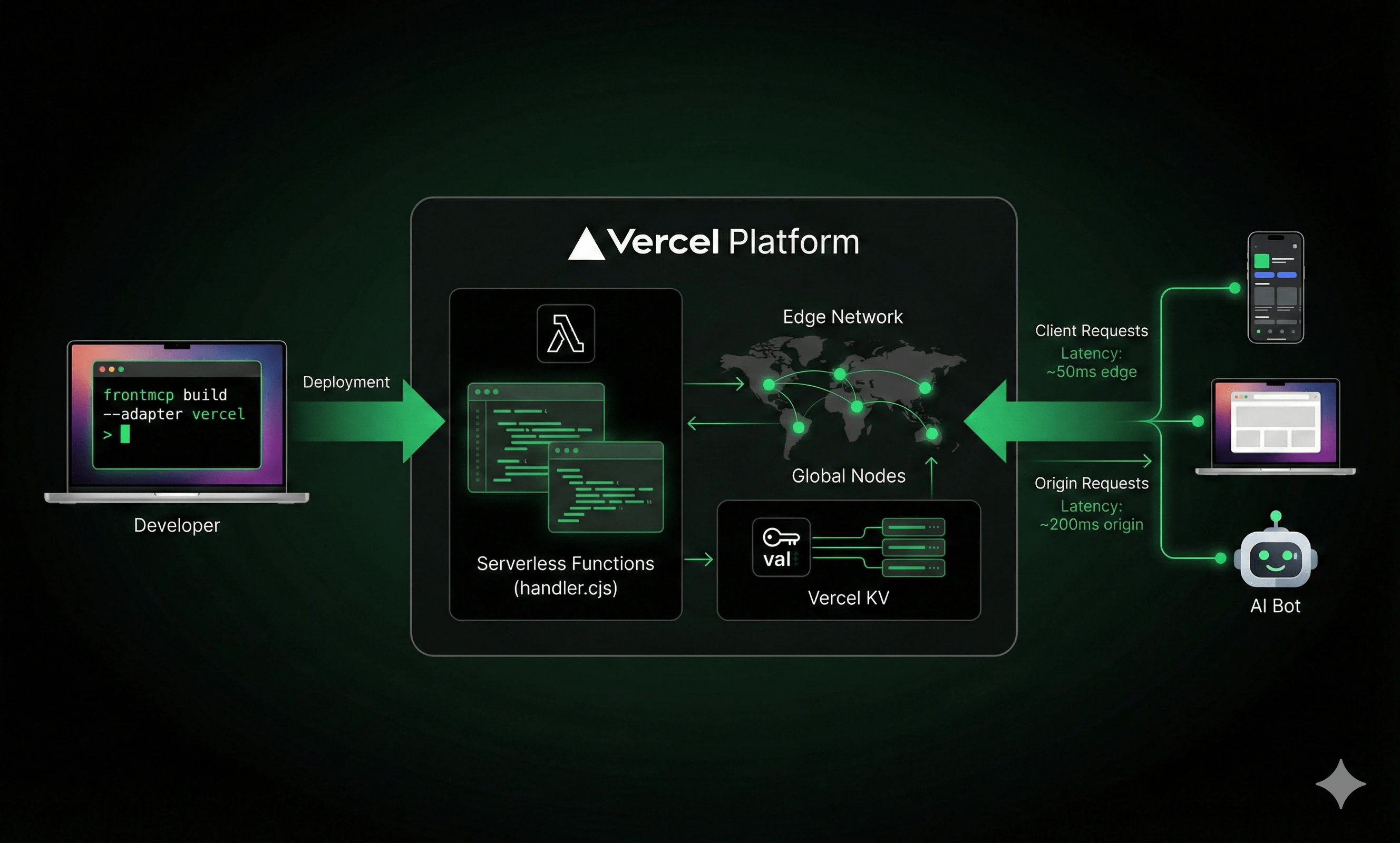 ## Deployment Steps
Run the build command:
```bash theme={"theme":{"light":"snazzy-light","dark":"dark-plus"}}
frontmcp build --adapter vercel
```
You should see `.vercel/output/` directory created.
Your MCP server likely needs API keys. Add them to `.env.local`:
```bash theme={"theme":{"light":"snazzy-light","dark":"dark-plus"}}
OPENAI_API_KEY=sk-...
DATABASE_URL=postgresql://...
```
For production, set them in Vercel Dashboard or via CLI:
```bash theme={"theme":{"light":"snazzy-light","dark":"dark-plus"}}
vercel env add OPENAI_API_KEY production
```
Run the deploy command:
```bash theme={"theme":{"light":"snazzy-light","dark":"dark-plus"}}
vercel deploy
```
For production:
```bash theme={"theme":{"light":"snazzy-light","dark":"dark-plus"}}
vercel deploy --prod
```
Vercel returns a URL like `https://my-mcp-server.vercel.app`
Test your deployment:
```bash theme={"theme":{"light":"snazzy-light","dark":"dark-plus"}}
curl https://my-mcp-server.vercel.app/health
# Expected: {"status":"ok","serverless":true}
```
Or test the MCP endpoint:
```bash theme={"theme":{"light":"snazzy-light","dark":"dark-plus"}}
curl -X POST https://my-mcp-server.vercel.app/mcp \
-H "Content-Type: application/json" \
-d '{"jsonrpc":"2.0","id":1,"method":"initialize","params":{"protocolVersion":"2024-11-05","capabilities":{},"clientInfo":{"name":"test","version":"1.0"}}}'
```
***
## Adding Vercel KV for Sessions
Standard Redis requires a persistent TCP connection—which serverless doesn't have. Vercel KV is a REST-based key-value store that works perfectly with serverless.
### Enable Vercel KV
In Vercel Dashboard:
1. Go to your project → Storage
2. Click "Create Database"
3. Select "KV"
4. Name it (e.g., `my-mcp-sessions`)
Vercel automatically adds `KV_REST_API_URL` and `KV_REST_API_TOKEN` to your environment.
Update your server configuration:
```typescript theme={"theme":{"light":"snazzy-light","dark":"dark-plus"}}
@FrontMcp({
info: { name: 'My MCP Server', version: '1.0.0' },
redis: {
provider: 'vercel-kv',
// Environment variables are auto-detected
// url: process.env.KV_REST_API_URL,
// token: process.env.KV_REST_API_TOKEN,
keyPrefix: 'mcp:',
defaultTtlMs: 7200000, // 2 hours
},
})
export default class MyServer {}
```
```bash theme={"theme":{"light":"snazzy-light","dark":"dark-plus"}}
frontmcp build --adapter vercel
vercel deploy --prod
```
### Vercel KV vs Standard Redis
| Feature | Vercel KV | Standard Redis |
| -------------------------- | ---------------------- | ------------------------- |
| **Transport** | REST (edge-compatible) | TCP (requires connection) |
| **Latency** | \~5-15ms | \~1-5ms |
| **Pub/Sub** | Not supported | Supported |
| **Resource Subscriptions** | Requires hybrid setup | Fully supported |
| **Setup** | One-click in dashboard | Provision + configure |
| **Cost** | Pay-per-request | Fixed instance cost |
For most MCP servers, Vercel KV is the right choice. It handles sessions, caching, and state—which is 90% of what you need. Only use standard Redis if you need real-time resource subscriptions.
***
## Serverless Considerations
### Function Timeout
Vercel serverless functions have timeout limits:
| Tier | Max Duration |
| ---------- | ------------ |
| Hobby | 60 seconds |
| Pro | 300 seconds |
| Enterprise | 900 seconds |
If your MCP operations take longer than 60 seconds on Hobby tier, they'll fail. For long-running agent tasks, consider Pro tier or chunking the work.
FrontMCP uses Vercel's Build Output API, so max duration is configured in the function's `.vc-config.json`. You can customize this via the CLI:
```bash theme={"theme":{"light":"snazzy-light","dark":"dark-plus"}}
frontmcp build --adapter vercel --max-duration 300
```
This generates `.vercel/output/functions/index.func/.vc-config.json`:
```json theme={"theme":{"light":"snazzy-light","dark":"dark-plus"}}
{
"runtime": "nodejs22.x",
"handler": "handler.cjs",
"launcherType": "Nodejs",
"maxDuration": 300
}
```
The `maxDuration` value must not exceed your Vercel tier limit. Hobby tier caps at 60 seconds.
### Cold Starts
The first request after idle may take 1-3 seconds while Vercel spins up your function. Subsequent requests (warm starts) are much faster.
FrontMCP tracks this for you:
```typescript theme={"theme":{"light":"snazzy-light","dark":"dark-plus"}}
// Available in your tools/resources
const info = ctx.scope.serverlessInfo;
console.log(info.isColdStart); // true on first request
console.log(info.invocationCount); // number of requests since cold start
```
### Session Persistence Across Cold Starts
Here's where FrontMCP shines: **clients don't need to re-initialize MCP when functions wake up from idle.**
Traditional MCP servers lose all state when they restart. Clients must detect the disconnect, re-send `initialize`, and rebuild their session. This creates a terrible user experience in serverless environments where functions spin down after \~15 minutes of inactivity.
FrontMCP handles this automatically:
```mermaid theme={"theme":{"light":"snazzy-light","dark":"dark-plus"}}
sequenceDiagram
participant Client as MCP Client
participant Vercel as Vercel Function
participant KV as Vercel KV
Note over Vercel: Function idle, spun down
Client->>Vercel: tools/call (with session-id header)
Note over Vercel: Cold start - function wakes up
Vercel->>KV: Load session by ID
KV-->>Vercel: Session state restored
Vercel->>Vercel: Recreate transport context
Vercel-->>Client: Tool result (no re-init needed!)
```
As long as the client sends its `session-id` header (or uses the same SSE connection URL with session token), FrontMCP reconstructs the full session context from Vercel KV. The client continues as if nothing happened—no `initialize` call required.
This means:
* **No client-side reconnection logic** needed for cold starts
* **Session state persists** across function invocations
* **Seamless experience** even with aggressive function recycling
### Resource Subscriptions (Hybrid Setup)
Vercel KV doesn't support Pub/Sub, which means real-time resource subscriptions won't work out of the box. If you need subscriptions:
```typescript theme={"theme":{"light":"snazzy-light","dark":"dark-plus"}}
@FrontMcp({
info: { name: 'My Server', version: '1.0.0' },
// Sessions via Vercel KV (edge-compatible)
redis: {
provider: 'vercel-kv',
},
// Pub/Sub via external Redis (for subscriptions)
pubsub: {
host: process.env.REDIS_HOST,
port: 6379,
password: process.env.REDIS_PASSWORD,
},
})
```
* **Upstash** - Serverless Redis, pay-per-request, integrates with Vercel
* **Redis Cloud** - Managed Redis with free tier
* **AWS ElastiCache** - If you're already on AWS
***
## Project Structure
A typical Vercel-ready FrontMCP project:
```
my-mcp-server/
├── src/
│ ├── main.ts # Server entry point
│ ├── apps/
│ │ └── my-app/
│ │ ├── index.ts # App definition
│ │ └── tools/ # Tool implementations
│ └── providers/ # Shared providers
├── .env.local # Local environment
├── package.json
├── tsconfig.json
└── vercel.json # Generated by build
```
Your `vercel.json` (auto-generated):
```json theme={"theme":{"light":"snazzy-light","dark":"dark-plus"}}
{
"version": 2,
"buildCommand": "npm run build",
"installCommand": "npm install"
}
```
FrontMCP auto-detects your package manager. If you use yarn or pnpm, the generated `vercel.json` will have the correct commands.
***
## Monitoring & Debugging
### Vercel Dashboard
The Vercel dashboard shows:
* Function invocations and duration
* Error rates and logs
* Request/response details
Navigate to **Project → Functions** to see real-time data.
### Logging
FrontMCP logs are captured by Vercel:
```typescript theme={"theme":{"light":"snazzy-light","dark":"dark-plus"}}
@Tool({ name: 'my-tool' })
class MyTool extends ToolContext {
async execute(input: any) {
console.log('Processing:', input); // Visible in Vercel logs
this.notify('Starting processing...', 'info');
// ...
}
}
```
View logs with:
```bash theme={"theme":{"light":"snazzy-light","dark":"dark-plus"}}
vercel logs https://my-mcp-server.vercel.app
```
### Error Tracking
For production, connect Vercel to your error tracking service:
```typescript theme={"theme":{"light":"snazzy-light","dark":"dark-plus"}}
// In your server configuration
@FrontMcp({
// ...
logging: {
level: 'info',
format: 'json', // Structured logs for parsing
},
})
```
***
## CI/CD Setup
Connect your git repository for automatic deployments:
In Vercel Dashboard:
1. Import your GitHub/GitLab/Bitbucket repo
2. Vercel auto-detects the build settings
Set the build command in project settings:
* **Build Command:** `frontmcp build --adapter vercel`
* **Output Directory:** `.vercel/output`
* **Install Command:** `npm install` (or yarn/pnpm)
Every push to `main` triggers a production deployment.
Pull requests get preview deployments.
***
## Cost Optimization
Vercel's serverless pricing is usage-based:
| Resource | Hobby (Free) | Pro (\$20/mo) |
| -------------------- | ------------ | ------------- |
| Function Invocations | 100K/mo | 1M/mo |
| Function Duration | 100 GB-hrs | 1000 GB-hrs |
| Bandwidth | 100 GB | 1 TB |
| KV Operations | 30K/day | 150K/day |
For MCP servers, the main cost drivers are function duration (LLM calls take time) and KV operations (session storage). Most projects stay well within free tier limits.
***
## Troubleshooting
**Symptom:** 504 Gateway Timeout
**Solution:**
* Increase max duration in `vercel.json`
* Upgrade to Pro tier for longer limits
* Break long operations into smaller chunks
**Symptom:** `OPENAI_API_KEY is not defined`
**Solution:**
```bash theme={"theme":{"light":"snazzy-light","dark":"dark-plus"}}
vercel env add OPENAI_API_KEY production
vercel deploy --prod
```
**Symptom:** First request takes 2-3 seconds
**Solution:** This is expected for serverless. For lower latency:
* Keep functions small (faster cold starts)
* Use edge functions for ultra-low latency
* Consider Pro tier with more resources
**Symptom:** `Could not connect to Vercel KV`
**Solution:**
* Ensure KV database is linked to project
* Check that `KV_REST_API_URL` and `KV_REST_API_TOKEN` are set
* Redeploy after linking KV
***
## What's Next
Deep dive into serverless patterns, hybrid configurations, and edge optimization
Complete guide to session storage, caching, and KV best practices
Security hardening, monitoring, and production readiness
Alternative: Deploy to AWS Lambda with SAM or Serverless Framework
***
*FrontMCP supports multiple deployment targets: Vercel, AWS Lambda, Cloudflare Workers, and traditional Node.js servers. Choose what fits your infrastructure.*
*[Star us on GitHub](https://github.com/agentfront/frontmcp) to follow development.*
## Deployment Steps
Run the build command:
```bash theme={"theme":{"light":"snazzy-light","dark":"dark-plus"}}
frontmcp build --adapter vercel
```
You should see `.vercel/output/` directory created.
Your MCP server likely needs API keys. Add them to `.env.local`:
```bash theme={"theme":{"light":"snazzy-light","dark":"dark-plus"}}
OPENAI_API_KEY=sk-...
DATABASE_URL=postgresql://...
```
For production, set them in Vercel Dashboard or via CLI:
```bash theme={"theme":{"light":"snazzy-light","dark":"dark-plus"}}
vercel env add OPENAI_API_KEY production
```
Run the deploy command:
```bash theme={"theme":{"light":"snazzy-light","dark":"dark-plus"}}
vercel deploy
```
For production:
```bash theme={"theme":{"light":"snazzy-light","dark":"dark-plus"}}
vercel deploy --prod
```
Vercel returns a URL like `https://my-mcp-server.vercel.app`
Test your deployment:
```bash theme={"theme":{"light":"snazzy-light","dark":"dark-plus"}}
curl https://my-mcp-server.vercel.app/health
# Expected: {"status":"ok","serverless":true}
```
Or test the MCP endpoint:
```bash theme={"theme":{"light":"snazzy-light","dark":"dark-plus"}}
curl -X POST https://my-mcp-server.vercel.app/mcp \
-H "Content-Type: application/json" \
-d '{"jsonrpc":"2.0","id":1,"method":"initialize","params":{"protocolVersion":"2024-11-05","capabilities":{},"clientInfo":{"name":"test","version":"1.0"}}}'
```
***
## Adding Vercel KV for Sessions
Standard Redis requires a persistent TCP connection—which serverless doesn't have. Vercel KV is a REST-based key-value store that works perfectly with serverless.
### Enable Vercel KV
In Vercel Dashboard:
1. Go to your project → Storage
2. Click "Create Database"
3. Select "KV"
4. Name it (e.g., `my-mcp-sessions`)
Vercel automatically adds `KV_REST_API_URL` and `KV_REST_API_TOKEN` to your environment.
Update your server configuration:
```typescript theme={"theme":{"light":"snazzy-light","dark":"dark-plus"}}
@FrontMcp({
info: { name: 'My MCP Server', version: '1.0.0' },
redis: {
provider: 'vercel-kv',
// Environment variables are auto-detected
// url: process.env.KV_REST_API_URL,
// token: process.env.KV_REST_API_TOKEN,
keyPrefix: 'mcp:',
defaultTtlMs: 7200000, // 2 hours
},
})
export default class MyServer {}
```
```bash theme={"theme":{"light":"snazzy-light","dark":"dark-plus"}}
frontmcp build --adapter vercel
vercel deploy --prod
```
### Vercel KV vs Standard Redis
| Feature | Vercel KV | Standard Redis |
| -------------------------- | ---------------------- | ------------------------- |
| **Transport** | REST (edge-compatible) | TCP (requires connection) |
| **Latency** | \~5-15ms | \~1-5ms |
| **Pub/Sub** | Not supported | Supported |
| **Resource Subscriptions** | Requires hybrid setup | Fully supported |
| **Setup** | One-click in dashboard | Provision + configure |
| **Cost** | Pay-per-request | Fixed instance cost |
For most MCP servers, Vercel KV is the right choice. It handles sessions, caching, and state—which is 90% of what you need. Only use standard Redis if you need real-time resource subscriptions.
***
## Serverless Considerations
### Function Timeout
Vercel serverless functions have timeout limits:
| Tier | Max Duration |
| ---------- | ------------ |
| Hobby | 60 seconds |
| Pro | 300 seconds |
| Enterprise | 900 seconds |
If your MCP operations take longer than 60 seconds on Hobby tier, they'll fail. For long-running agent tasks, consider Pro tier or chunking the work.
FrontMCP uses Vercel's Build Output API, so max duration is configured in the function's `.vc-config.json`. You can customize this via the CLI:
```bash theme={"theme":{"light":"snazzy-light","dark":"dark-plus"}}
frontmcp build --adapter vercel --max-duration 300
```
This generates `.vercel/output/functions/index.func/.vc-config.json`:
```json theme={"theme":{"light":"snazzy-light","dark":"dark-plus"}}
{
"runtime": "nodejs22.x",
"handler": "handler.cjs",
"launcherType": "Nodejs",
"maxDuration": 300
}
```
The `maxDuration` value must not exceed your Vercel tier limit. Hobby tier caps at 60 seconds.
### Cold Starts
The first request after idle may take 1-3 seconds while Vercel spins up your function. Subsequent requests (warm starts) are much faster.
FrontMCP tracks this for you:
```typescript theme={"theme":{"light":"snazzy-light","dark":"dark-plus"}}
// Available in your tools/resources
const info = ctx.scope.serverlessInfo;
console.log(info.isColdStart); // true on first request
console.log(info.invocationCount); // number of requests since cold start
```
### Session Persistence Across Cold Starts
Here's where FrontMCP shines: **clients don't need to re-initialize MCP when functions wake up from idle.**
Traditional MCP servers lose all state when they restart. Clients must detect the disconnect, re-send `initialize`, and rebuild their session. This creates a terrible user experience in serverless environments where functions spin down after \~15 minutes of inactivity.
FrontMCP handles this automatically:
```mermaid theme={"theme":{"light":"snazzy-light","dark":"dark-plus"}}
sequenceDiagram
participant Client as MCP Client
participant Vercel as Vercel Function
participant KV as Vercel KV
Note over Vercel: Function idle, spun down
Client->>Vercel: tools/call (with session-id header)
Note over Vercel: Cold start - function wakes up
Vercel->>KV: Load session by ID
KV-->>Vercel: Session state restored
Vercel->>Vercel: Recreate transport context
Vercel-->>Client: Tool result (no re-init needed!)
```
As long as the client sends its `session-id` header (or uses the same SSE connection URL with session token), FrontMCP reconstructs the full session context from Vercel KV. The client continues as if nothing happened—no `initialize` call required.
This means:
* **No client-side reconnection logic** needed for cold starts
* **Session state persists** across function invocations
* **Seamless experience** even with aggressive function recycling
### Resource Subscriptions (Hybrid Setup)
Vercel KV doesn't support Pub/Sub, which means real-time resource subscriptions won't work out of the box. If you need subscriptions:
```typescript theme={"theme":{"light":"snazzy-light","dark":"dark-plus"}}
@FrontMcp({
info: { name: 'My Server', version: '1.0.0' },
// Sessions via Vercel KV (edge-compatible)
redis: {
provider: 'vercel-kv',
},
// Pub/Sub via external Redis (for subscriptions)
pubsub: {
host: process.env.REDIS_HOST,
port: 6379,
password: process.env.REDIS_PASSWORD,
},
})
```
* **Upstash** - Serverless Redis, pay-per-request, integrates with Vercel
* **Redis Cloud** - Managed Redis with free tier
* **AWS ElastiCache** - If you're already on AWS
***
## Project Structure
A typical Vercel-ready FrontMCP project:
```
my-mcp-server/
├── src/
│ ├── main.ts # Server entry point
│ ├── apps/
│ │ └── my-app/
│ │ ├── index.ts # App definition
│ │ └── tools/ # Tool implementations
│ └── providers/ # Shared providers
├── .env.local # Local environment
├── package.json
├── tsconfig.json
└── vercel.json # Generated by build
```
Your `vercel.json` (auto-generated):
```json theme={"theme":{"light":"snazzy-light","dark":"dark-plus"}}
{
"version": 2,
"buildCommand": "npm run build",
"installCommand": "npm install"
}
```
FrontMCP auto-detects your package manager. If you use yarn or pnpm, the generated `vercel.json` will have the correct commands.
***
## Monitoring & Debugging
### Vercel Dashboard
The Vercel dashboard shows:
* Function invocations and duration
* Error rates and logs
* Request/response details
Navigate to **Project → Functions** to see real-time data.
### Logging
FrontMCP logs are captured by Vercel:
```typescript theme={"theme":{"light":"snazzy-light","dark":"dark-plus"}}
@Tool({ name: 'my-tool' })
class MyTool extends ToolContext {
async execute(input: any) {
console.log('Processing:', input); // Visible in Vercel logs
this.notify('Starting processing...', 'info');
// ...
}
}
```
View logs with:
```bash theme={"theme":{"light":"snazzy-light","dark":"dark-plus"}}
vercel logs https://my-mcp-server.vercel.app
```
### Error Tracking
For production, connect Vercel to your error tracking service:
```typescript theme={"theme":{"light":"snazzy-light","dark":"dark-plus"}}
// In your server configuration
@FrontMcp({
// ...
logging: {
level: 'info',
format: 'json', // Structured logs for parsing
},
})
```
***
## CI/CD Setup
Connect your git repository for automatic deployments:
In Vercel Dashboard:
1. Import your GitHub/GitLab/Bitbucket repo
2. Vercel auto-detects the build settings
Set the build command in project settings:
* **Build Command:** `frontmcp build --adapter vercel`
* **Output Directory:** `.vercel/output`
* **Install Command:** `npm install` (or yarn/pnpm)
Every push to `main` triggers a production deployment.
Pull requests get preview deployments.
***
## Cost Optimization
Vercel's serverless pricing is usage-based:
| Resource | Hobby (Free) | Pro (\$20/mo) |
| -------------------- | ------------ | ------------- |
| Function Invocations | 100K/mo | 1M/mo |
| Function Duration | 100 GB-hrs | 1000 GB-hrs |
| Bandwidth | 100 GB | 1 TB |
| KV Operations | 30K/day | 150K/day |
For MCP servers, the main cost drivers are function duration (LLM calls take time) and KV operations (session storage). Most projects stay well within free tier limits.
***
## Troubleshooting
**Symptom:** 504 Gateway Timeout
**Solution:**
* Increase max duration in `vercel.json`
* Upgrade to Pro tier for longer limits
* Break long operations into smaller chunks
**Symptom:** `OPENAI_API_KEY is not defined`
**Solution:**
```bash theme={"theme":{"light":"snazzy-light","dark":"dark-plus"}}
vercel env add OPENAI_API_KEY production
vercel deploy --prod
```
**Symptom:** First request takes 2-3 seconds
**Solution:** This is expected for serverless. For lower latency:
* Keep functions small (faster cold starts)
* Use edge functions for ultra-low latency
* Consider Pro tier with more resources
**Symptom:** `Could not connect to Vercel KV`
**Solution:**
* Ensure KV database is linked to project
* Check that `KV_REST_API_URL` and `KV_REST_API_TOKEN` are set
* Redeploy after linking KV
***
## What's Next
Deep dive into serverless patterns, hybrid configurations, and edge optimization
Complete guide to session storage, caching, and KV best practices
Security hardening, monitoring, and production readiness
Alternative: Deploy to AWS Lambda with SAM or Serverless Framework
***
*FrontMCP supports multiple deployment targets: Vercel, AWS Lambda, Cloudflare Workers, and traditional Node.js servers. Choose what fits your infrastructure.*
*[Star us on GitHub](https://github.com/agentfront/frontmcp) to follow development.*