> ## Documentation Index
> Fetch the complete documentation index at: https://docs.agentfront.dev/llms.txt
> Use this file to discover all available pages before exploring further.
# AgentScript Guide
> Complete guide to writing AgentScript - the safe JavaScript subset used inside codecall:execute scripts.
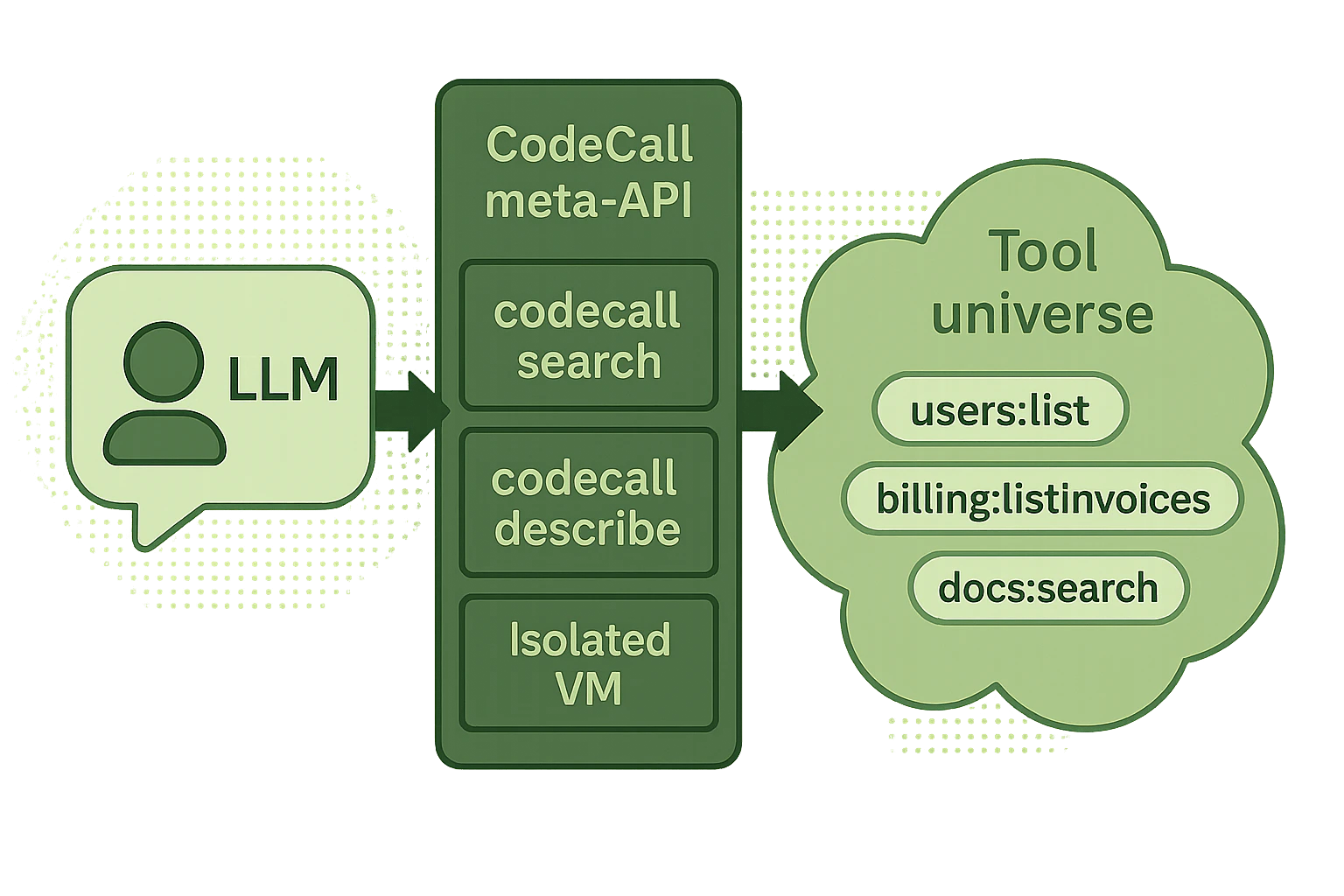 **AgentScript** is the safe JavaScript subset that runs inside `codecall:execute`. It gives LLMs the power to orchestrate multiple tools, filter data, and build workflows — while the [security pipeline](/frontmcp/plugins/codecall/security) ensures every script is validated, transformed, and sandboxed before execution.
***
## Core APIs
### callTool(name, input, options?)
Call a registered tool and get the result.
```ts theme={"theme":{"light":"snazzy-light","dark":"dark-plus"}}
// Basic call - throws on error by default
const users = await callTool('users:list', { limit: 100 });
// Safe pattern - returns result object instead of throwing
const result = await callTool('users:get', { id: 'maybe-invalid' }, {
throwOnError: false
});
if (result.success) {
return result.data;
} else {
return { error: result.error.message };
}
```
**Parameters:**
| Parameter | Type | Required | Description |
| --------- | -------- | -------- | -------------------------------- |
| `name` | `string` | Yes | Tool name (e.g., `'users:list'`) |
| `input` | `object` | Yes | Input arguments for the tool |
| `options` | `object` | No | Execution options |
**Options:**
| Option | Type | Default | Description |
| -------------- | --------- | ------- | -------------------------------------------------------------------- |
| `throwOnError` | `boolean` | `true` | When `false`, returns `{ success, data, error }` instead of throwing |
**Return value (when `throwOnError: false`):**
```ts theme={"theme":{"light":"snazzy-light","dark":"dark-plus"}}
// Success
{ success: true, data: { /* tool result */ } }
// Failure
{ success: false, error: { message: string, code?: string } }
```
***
### getTool(name)
Get metadata about a tool (name, description, schemas) without calling it.
```ts theme={"theme":{"light":"snazzy-light","dark":"dark-plus"}}
const meta = getTool('users:list');
console.log(meta.description); // "List users with optional filtering"
console.log(meta.inputSchema); // { type: "object", properties: { ... } }
```
***
### codecallContext
Read-only context object passed in the `codecall:execute` request. Use it to access tenant information, user IDs, or any custom data.
```ts theme={"theme":{"light":"snazzy-light","dark":"dark-plus"}}
const tenantId = codecallContext.tenantId;
const userId = codecallContext.userId;
// Cannot modify - object is frozen
codecallContext.tenantId = 'other'; // ❌ Throws error
```
***
### console (if enabled)
Standard console methods, captured in the response `logs` array.
```ts theme={"theme":{"light":"snazzy-light","dark":"dark-plus"}}
console.log('Processing users...');
console.warn('Large dataset detected');
console.error('Validation failed');
```
Console is only available if `vm.allowConsole: true` in plugin config. Logs are returned in the `logs` array of the response.
***
### \_\_safe\_parallel(fns, options?)
Execute multiple async operations in parallel with controlled concurrency.
```ts theme={"theme":{"light":"snazzy-light","dark":"dark-plus"}}
const userIds = ['user-1', 'user-2', 'user-3', 'user-4', 'user-5'];
const users = await __safe_parallel(
userIds.map(id => () => callTool('users:get', { id })),
{ maxConcurrency: 3 }
);
return users; // Array of results in same order as input
```
**Options:**
| Option | Type | Default | Max | Description |
| ---------------- | -------- | ------- | --- | ------------------------- |
| `maxConcurrency` | `number` | 10 | 20 | Max concurrent operations |
**Limits:**
| Limit | Value | Error |
| --------------- | ----- | ----------------------------------------------------- |
| Max array size | 100 | `Cannot execute more than 100 operations in parallel` |
| Max concurrency | 20 | Silently clamped |
**Error behavior:** If any operation fails, the entire `__safe_parallel` call fails with a combined error message.
```ts theme={"theme":{"light":"snazzy-light","dark":"dark-plus"}}
try {
const results = await __safe_parallel([
() => callTool('users:get', { id: 'valid' }),
() => callTool('users:get', { id: 'invalid' }), // Throws
() => callTool('users:get', { id: 'also-valid' }),
]);
} catch (error) {
// "1 of 3 parallel operations failed:
// [1]: User not found"
}
```
***
## What You Can Write
AgentScript supports a safe subset of JavaScript:
```js theme={"theme":{"light":"snazzy-light","dark":"dark-plus"}}
// ✅ Tool calls
const users = await callTool('users:list', { limit: 100 });
// ✅ Variables (const, let)
const filtered = users.filter(u => u.active);
let count = 0;
// ✅ Arrow functions
const names = users.map(u => u.name);
const total = users.reduce((sum, u) => sum + u.score, 0);
// ✅ Bounded loops
for (let i = 0; i < users.length; i++) { count++; }
for (const user of users) { console.log(user.name); }
// ✅ Template literals
const greeting = `Hello, ${user.name}!`;
// ✅ Destructuring
const { name, email } = user;
const [first, ...rest] = users;
// ✅ Try/catch
try {
const data = await callTool('api:fetch', { url: '/data' });
} catch (e) {
return { error: e.message };
}
// ✅ Safe built-ins
const max = Math.max(1, 2, 3);
const parsed = JSON.parse('{"a":1}');
const keys = Object.keys(obj);
const now = new Date();
// ✅ Context access (read-only)
const tenant = codecallContext.tenantId;
// ✅ Return values
return { count, names, total };
```
***
## What Is Blocked
Dynamic code execution is blocked to prevent injection attacks.
```js theme={"theme":{"light":"snazzy-light","dark":"dark-plus"}}
eval('malicious code'); // ❌ Blocked
new Function('return process')(); // ❌ Blocked
```
Module loading is blocked to prevent sandbox escape.
```js theme={"theme":{"light":"snazzy-light","dark":"dark-plus"}}
require('fs'); // ❌ Blocked
import('child_process'); // ❌ Blocked
```
No access to Node.js globals or the host environment.
```js theme={"theme":{"light":"snazzy-light","dark":"dark-plus"}}
process.env.SECRET; // ❌ Blocked
global.something; // ❌ Blocked
globalThis.escape; // ❌ Blocked
this.constructor; // ❌ Blocked
```
Unbounded loops are blocked to prevent infinite execution.
```js theme={"theme":{"light":"snazzy-light","dark":"dark-plus"}}
while (true) {} // ❌ Blocked
do {} while (condition); // ❌ Blocked
for (key in obj) {} // ❌ Blocked (prototype walking)
```
Use `for-of` or `for` with bounds instead.
Prototype manipulation is blocked to prevent pollution attacks.
```js theme={"theme":{"light":"snazzy-light","dark":"dark-plus"}}
obj.__proto__ = {}; // ❌ Blocked
obj.constructor.prototype.x = 1; // ❌ Blocked
Object.prototype.polluted = true; // ❌ Blocked
```
Identifiers starting with `__ag_` or `__safe_` are reserved for the runtime.
```js theme={"theme":{"light":"snazzy-light","dark":"dark-plus"}}
const __ag_hack = 'foo'; // ❌ Blocked
let __safe_bypass = 123; // ❌ Blocked
```
Async escape via timers is blocked.
```js theme={"theme":{"light":"snazzy-light","dark":"dark-plus"}}
setTimeout(fn, 100); // ❌ Blocked
setInterval(fn, 100); // ❌ Blocked
setImmediate(fn); // ❌ Blocked
```
In AgentScript's strict mode, regex literals are blocked to prevent ReDoS.
```js theme={"theme":{"light":"snazzy-light","dark":"dark-plus"}}
/pattern/.test(str); // ❌ Blocked in strict mode
```
***
## Error Handling Patterns
### Basic: throwOnError
```ts theme={"theme":{"light":"snazzy-light","dark":"dark-plus"}}
// Default: throws on error
const users = await callTool('users:list', { limit: 100 });
// Safe: returns result object
const result = await callTool('users:get', { id: 'maybe-invalid' }, {
throwOnError: false
});
if (result.success) {
return { user: result.data };
} else {
return { error: result.error.message, fallback: 'default-user' };
}
```
### Retry Pattern
```ts theme={"theme":{"light":"snazzy-light","dark":"dark-plus"}}
const retryTool = async (toolName, args, maxRetries = 3) => {
for (let attempt = 1; attempt <= maxRetries; attempt++) {
const result = await callTool(toolName, args, { throwOnError: false });
if (result.success) {
return result.data;
}
// Don't retry non-transient errors
if (result.error.code === 'NOT_FOUND' || result.error.code === 'VALIDATION_ERROR') {
throw new Error(result.error.message);
}
if (attempt === maxRetries) {
throw new Error(`Failed after ${maxRetries} attempts: ${result.error.message}`);
}
console.warn(`Attempt ${attempt} failed, retrying...`);
}
};
const data = await retryTool('api:fetch', { url: '/data' });
```
### Fallback Pattern
```ts theme={"theme":{"light":"snazzy-light","dark":"dark-plus"}}
// Try primary, fall back to secondary
const result = await callTool('cache:get', { key: 'users' }, { throwOnError: false });
const users = result.success
? result.data
: await callTool('db:query', { table: 'users' });
return users;
```
### Partial Success Pattern
```ts theme={"theme":{"light":"snazzy-light","dark":"dark-plus"}}
const ids = ['id-1', 'id-2', 'id-3', 'id-4'];
const results = { success: [], failed: [] };
for (const id of ids) {
const result = await callTool('users:get', { id }, { throwOnError: false });
if (result.success) {
results.success.push(result.data);
} else {
results.failed.push({ id, error: result.error.message });
}
}
return {
users: results.success,
errors: results.failed,
successRate: results.success.length / ids.length,
};
```
***
## Parallel Execution
Use `__safe_parallel` for concurrent operations:
### Batch Fetching
```ts theme={"theme":{"light":"snazzy-light","dark":"dark-plus"}}
const ids = await callTool('users:listIds', { limit: 50 });
const users = await __safe_parallel(
ids.map(id => () => callTool('users:get', { id }))
);
return users;
```
### Parallel Aggregation
```ts theme={"theme":{"light":"snazzy-light","dark":"dark-plus"}}
const [orders, users, metrics] = await __safe_parallel([
() => callTool('orders:list', { status: 'pending' }),
() => callTool('users:list', { role: 'admin' }),
() => callTool('analytics:getMetrics', {}),
]);
return {
pendingOrders: orders.length,
adminCount: users.length,
metrics,
};
```
***
## Best Practices
**Keep scripts focused.** Each script should do one logical operation. Break complex workflows into separate `codecall:execute` calls rather than writing mega-scripts.
**Paginate large datasets.** Don't fetch everything at once. Use `limit` and `offset` parameters, and filter server-side.
**Use `throwOnError: false` for optional operations.** When a failure in one tool call shouldn't abort the entire script, use the safe pattern.
**Return only what you need.** Filter and transform data inside the script so the LLM receives a minimal, focused result instead of raw tool output.
***
## Next Steps
Complete meta-tool schemas, error codes, and debugging guide
Real-world patterns built with AgentScript
How AgentScript is validated, transformed, and sandboxed
VM presets, iteration limits, and console settings
**AgentScript** is the safe JavaScript subset that runs inside `codecall:execute`. It gives LLMs the power to orchestrate multiple tools, filter data, and build workflows — while the [security pipeline](/frontmcp/plugins/codecall/security) ensures every script is validated, transformed, and sandboxed before execution.
***
## Core APIs
### callTool(name, input, options?)
Call a registered tool and get the result.
```ts theme={"theme":{"light":"snazzy-light","dark":"dark-plus"}}
// Basic call - throws on error by default
const users = await callTool('users:list', { limit: 100 });
// Safe pattern - returns result object instead of throwing
const result = await callTool('users:get', { id: 'maybe-invalid' }, {
throwOnError: false
});
if (result.success) {
return result.data;
} else {
return { error: result.error.message };
}
```
**Parameters:**
| Parameter | Type | Required | Description |
| --------- | -------- | -------- | -------------------------------- |
| `name` | `string` | Yes | Tool name (e.g., `'users:list'`) |
| `input` | `object` | Yes | Input arguments for the tool |
| `options` | `object` | No | Execution options |
**Options:**
| Option | Type | Default | Description |
| -------------- | --------- | ------- | -------------------------------------------------------------------- |
| `throwOnError` | `boolean` | `true` | When `false`, returns `{ success, data, error }` instead of throwing |
**Return value (when `throwOnError: false`):**
```ts theme={"theme":{"light":"snazzy-light","dark":"dark-plus"}}
// Success
{ success: true, data: { /* tool result */ } }
// Failure
{ success: false, error: { message: string, code?: string } }
```
***
### getTool(name)
Get metadata about a tool (name, description, schemas) without calling it.
```ts theme={"theme":{"light":"snazzy-light","dark":"dark-plus"}}
const meta = getTool('users:list');
console.log(meta.description); // "List users with optional filtering"
console.log(meta.inputSchema); // { type: "object", properties: { ... } }
```
***
### codecallContext
Read-only context object passed in the `codecall:execute` request. Use it to access tenant information, user IDs, or any custom data.
```ts theme={"theme":{"light":"snazzy-light","dark":"dark-plus"}}
const tenantId = codecallContext.tenantId;
const userId = codecallContext.userId;
// Cannot modify - object is frozen
codecallContext.tenantId = 'other'; // ❌ Throws error
```
***
### console (if enabled)
Standard console methods, captured in the response `logs` array.
```ts theme={"theme":{"light":"snazzy-light","dark":"dark-plus"}}
console.log('Processing users...');
console.warn('Large dataset detected');
console.error('Validation failed');
```
Console is only available if `vm.allowConsole: true` in plugin config. Logs are returned in the `logs` array of the response.
***
### \_\_safe\_parallel(fns, options?)
Execute multiple async operations in parallel with controlled concurrency.
```ts theme={"theme":{"light":"snazzy-light","dark":"dark-plus"}}
const userIds = ['user-1', 'user-2', 'user-3', 'user-4', 'user-5'];
const users = await __safe_parallel(
userIds.map(id => () => callTool('users:get', { id })),
{ maxConcurrency: 3 }
);
return users; // Array of results in same order as input
```
**Options:**
| Option | Type | Default | Max | Description |
| ---------------- | -------- | ------- | --- | ------------------------- |
| `maxConcurrency` | `number` | 10 | 20 | Max concurrent operations |
**Limits:**
| Limit | Value | Error |
| --------------- | ----- | ----------------------------------------------------- |
| Max array size | 100 | `Cannot execute more than 100 operations in parallel` |
| Max concurrency | 20 | Silently clamped |
**Error behavior:** If any operation fails, the entire `__safe_parallel` call fails with a combined error message.
```ts theme={"theme":{"light":"snazzy-light","dark":"dark-plus"}}
try {
const results = await __safe_parallel([
() => callTool('users:get', { id: 'valid' }),
() => callTool('users:get', { id: 'invalid' }), // Throws
() => callTool('users:get', { id: 'also-valid' }),
]);
} catch (error) {
// "1 of 3 parallel operations failed:
// [1]: User not found"
}
```
***
## What You Can Write
AgentScript supports a safe subset of JavaScript:
```js theme={"theme":{"light":"snazzy-light","dark":"dark-plus"}}
// ✅ Tool calls
const users = await callTool('users:list', { limit: 100 });
// ✅ Variables (const, let)
const filtered = users.filter(u => u.active);
let count = 0;
// ✅ Arrow functions
const names = users.map(u => u.name);
const total = users.reduce((sum, u) => sum + u.score, 0);
// ✅ Bounded loops
for (let i = 0; i < users.length; i++) { count++; }
for (const user of users) { console.log(user.name); }
// ✅ Template literals
const greeting = `Hello, ${user.name}!`;
// ✅ Destructuring
const { name, email } = user;
const [first, ...rest] = users;
// ✅ Try/catch
try {
const data = await callTool('api:fetch', { url: '/data' });
} catch (e) {
return { error: e.message };
}
// ✅ Safe built-ins
const max = Math.max(1, 2, 3);
const parsed = JSON.parse('{"a":1}');
const keys = Object.keys(obj);
const now = new Date();
// ✅ Context access (read-only)
const tenant = codecallContext.tenantId;
// ✅ Return values
return { count, names, total };
```
***
## What Is Blocked
Dynamic code execution is blocked to prevent injection attacks.
```js theme={"theme":{"light":"snazzy-light","dark":"dark-plus"}}
eval('malicious code'); // ❌ Blocked
new Function('return process')(); // ❌ Blocked
```
Module loading is blocked to prevent sandbox escape.
```js theme={"theme":{"light":"snazzy-light","dark":"dark-plus"}}
require('fs'); // ❌ Blocked
import('child_process'); // ❌ Blocked
```
No access to Node.js globals or the host environment.
```js theme={"theme":{"light":"snazzy-light","dark":"dark-plus"}}
process.env.SECRET; // ❌ Blocked
global.something; // ❌ Blocked
globalThis.escape; // ❌ Blocked
this.constructor; // ❌ Blocked
```
Unbounded loops are blocked to prevent infinite execution.
```js theme={"theme":{"light":"snazzy-light","dark":"dark-plus"}}
while (true) {} // ❌ Blocked
do {} while (condition); // ❌ Blocked
for (key in obj) {} // ❌ Blocked (prototype walking)
```
Use `for-of` or `for` with bounds instead.
Prototype manipulation is blocked to prevent pollution attacks.
```js theme={"theme":{"light":"snazzy-light","dark":"dark-plus"}}
obj.__proto__ = {}; // ❌ Blocked
obj.constructor.prototype.x = 1; // ❌ Blocked
Object.prototype.polluted = true; // ❌ Blocked
```
Identifiers starting with `__ag_` or `__safe_` are reserved for the runtime.
```js theme={"theme":{"light":"snazzy-light","dark":"dark-plus"}}
const __ag_hack = 'foo'; // ❌ Blocked
let __safe_bypass = 123; // ❌ Blocked
```
Async escape via timers is blocked.
```js theme={"theme":{"light":"snazzy-light","dark":"dark-plus"}}
setTimeout(fn, 100); // ❌ Blocked
setInterval(fn, 100); // ❌ Blocked
setImmediate(fn); // ❌ Blocked
```
In AgentScript's strict mode, regex literals are blocked to prevent ReDoS.
```js theme={"theme":{"light":"snazzy-light","dark":"dark-plus"}}
/pattern/.test(str); // ❌ Blocked in strict mode
```
***
## Error Handling Patterns
### Basic: throwOnError
```ts theme={"theme":{"light":"snazzy-light","dark":"dark-plus"}}
// Default: throws on error
const users = await callTool('users:list', { limit: 100 });
// Safe: returns result object
const result = await callTool('users:get', { id: 'maybe-invalid' }, {
throwOnError: false
});
if (result.success) {
return { user: result.data };
} else {
return { error: result.error.message, fallback: 'default-user' };
}
```
### Retry Pattern
```ts theme={"theme":{"light":"snazzy-light","dark":"dark-plus"}}
const retryTool = async (toolName, args, maxRetries = 3) => {
for (let attempt = 1; attempt <= maxRetries; attempt++) {
const result = await callTool(toolName, args, { throwOnError: false });
if (result.success) {
return result.data;
}
// Don't retry non-transient errors
if (result.error.code === 'NOT_FOUND' || result.error.code === 'VALIDATION_ERROR') {
throw new Error(result.error.message);
}
if (attempt === maxRetries) {
throw new Error(`Failed after ${maxRetries} attempts: ${result.error.message}`);
}
console.warn(`Attempt ${attempt} failed, retrying...`);
}
};
const data = await retryTool('api:fetch', { url: '/data' });
```
### Fallback Pattern
```ts theme={"theme":{"light":"snazzy-light","dark":"dark-plus"}}
// Try primary, fall back to secondary
const result = await callTool('cache:get', { key: 'users' }, { throwOnError: false });
const users = result.success
? result.data
: await callTool('db:query', { table: 'users' });
return users;
```
### Partial Success Pattern
```ts theme={"theme":{"light":"snazzy-light","dark":"dark-plus"}}
const ids = ['id-1', 'id-2', 'id-3', 'id-4'];
const results = { success: [], failed: [] };
for (const id of ids) {
const result = await callTool('users:get', { id }, { throwOnError: false });
if (result.success) {
results.success.push(result.data);
} else {
results.failed.push({ id, error: result.error.message });
}
}
return {
users: results.success,
errors: results.failed,
successRate: results.success.length / ids.length,
};
```
***
## Parallel Execution
Use `__safe_parallel` for concurrent operations:
### Batch Fetching
```ts theme={"theme":{"light":"snazzy-light","dark":"dark-plus"}}
const ids = await callTool('users:listIds', { limit: 50 });
const users = await __safe_parallel(
ids.map(id => () => callTool('users:get', { id }))
);
return users;
```
### Parallel Aggregation
```ts theme={"theme":{"light":"snazzy-light","dark":"dark-plus"}}
const [orders, users, metrics] = await __safe_parallel([
() => callTool('orders:list', { status: 'pending' }),
() => callTool('users:list', { role: 'admin' }),
() => callTool('analytics:getMetrics', {}),
]);
return {
pendingOrders: orders.length,
adminCount: users.length,
metrics,
};
```
***
## Best Practices
**Keep scripts focused.** Each script should do one logical operation. Break complex workflows into separate `codecall:execute` calls rather than writing mega-scripts.
**Paginate large datasets.** Don't fetch everything at once. Use `limit` and `offset` parameters, and filter server-side.
**Use `throwOnError: false` for optional operations.** When a failure in one tool call shouldn't abort the entire script, use the safe pattern.
**Return only what you need.** Filter and transform data inside the script so the LLM receives a minimal, focused result instead of raw tool output.
***
## Next Steps
Complete meta-tool schemas, error codes, and debugging guide
Real-world patterns built with AgentScript
How AgentScript is validated, transformed, and sandboxed
VM presets, iteration limits, and console settings